Note: This script is a part of Rigutils tool set. GitHub: AntiVirusTest.bat
Description
Some of bat scripts should be executed with so called elevated admin rights. Most of the times, then you just double click on a bat file a cmd.exe command prompt with non elevated rights starts, and bat file executes without sufficient rights. There is a way to automate the elevating process from script itself, but it may trigger false alert message from Windows Defender (see Trojan:Win32/Powessere.G).
Consider the following code:
set "self=%~s0"

whoami.exe /groups | findstr.exe "S-1-16-12288" >nul 2>&1 || (
  mshta.exe "javascript: var shell=new ActiveXObject('shell.application'); shell.ShellExecute('%self:\=\\%','','','runas',1); close();"
  exit /b
)

echo I'm running in elevated environment!
Let's go through it part by part:
set “self=%~s0”- assign to a variable with name 'self' the short (without spaces) file name of our script itself.whoami.exe /groups- Display group information for the user who is currently logged on to the local system (see official whoami manual). whoami is a system program located in C:\Windows\System32| findstr.exe “S-1-16-12288” >nul 2>&1- search for well known S-1-16-12288 group name in whoami output. findstr is a system program located in C:\Windows\System32. The sign “vertical bar” has its own name “pipe” and is used for redirecting text output stream (stdout) from one program to text input stream (stdin) of another program.|| (…)- if S-1-16-12288 was not found (findstr return false result) it means that our script is running in non elevated environment and expression in parentheses should be executed. Double pipes read as “logical or” operation.mshta.exe- is a standard windows program located in C:\Windows\System32\ It is used for running MS proprietary HTML applications (HTA for short). mshta is a system program located in C:\Windows\System32“javascript: . . .”- is a javascript code executed by mshtavar shell=new ActiveXObject('shell.application');- create an instance of shell.application objectshell.ShellExecute('%self:\=\\%',,,'runas',1);- execute our script given by variable self (expression %self:\=\\% just replaces single slash with double slash since this is js code) with admin rights. See ShellExecute documentation for more details.close();- just close mshta and exitexit /b- exit from non privileged part of our scriptecho I'm running in elevated environment!- self-explanatory statement
Well, why indeed Windows Defender think that this harmless code is a virus? It's because of the ShellExecute method call. There are known viruses/trojans which infect computers using exactly the same technique for getting into the elevated environment with admin rights.
After finishing the above text an idea came to my mind: Hey, let's try to fool Windows Defender by a simple trick - copy mstha.exe with a different name… And it turns out that this method works perfectly! So AntiVirusTest.bat was born. Get a copy of it and run from cmd.exe shell.
To my mind, such a Windows Defender bypass method is clearly a bug (not critical, but bug), feel free to submit it to MS bug bounty program and share your reward with me 
Seriously speaking, this trick may stop working in future. But luckily, Windows Defender has an exclusions list for trusted files and folders. If you ever got a message from Defender that mshta.exe pose a security risk to your system and block it from execution then you have to (re)enable it. After adding mstha.exe to the whitelist (see instruction below) of Windows Defender you may once again test your setup with AntiVirusTest.bat
Instruction
STEP 1. Launch command prompt via cmd_rigutils.bat
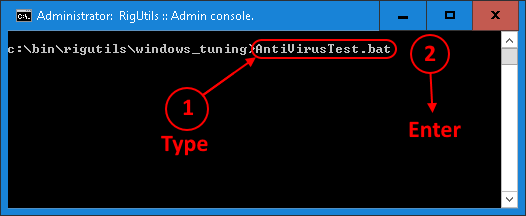
STEP 2. Run AntiVirusTest.bat
1. Type AntiVirusTest.bat (case of letters doesn't matter)
2. Press Enter
You may start typing Anti and then press the Tab key on your keyboard. cmd.exe will search for commands in current directory starting with Anti and expand it to it's full name automatically.
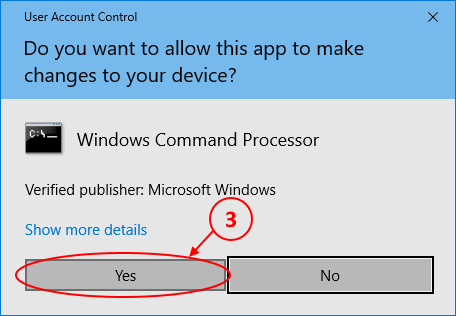
3. Confirm your action in this User Account Control dialog by clicking the Yes button. We will disable this annoying User Account Control messages later.
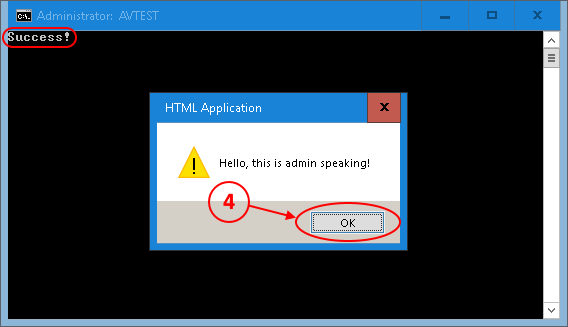
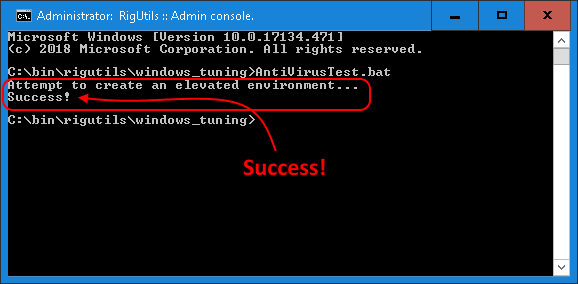
4. If you see a popup windows with the message Hello, this is admin speaking! then it means that AntiVirusTest passed successfully and you don't have to do anything special about Windows Defender at the moment. Just click OK and that's it.
If you see something different please continue to the next Step 3 "Troubleshooting"
attachment
attachment
attachment
attachment
STEP 3. Troubleshooting
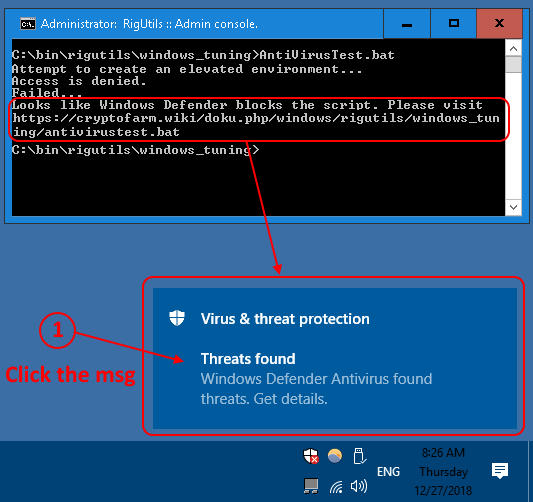
1. Most probably, you will see something similar to the screenshot - the message Looks like Windows Defender blocks the script and the popup window Threats found. If it is so then just click the blue popup window. Don't worry if the window dismissed too fast just follow these simple steps to open antivirus settings dialog and return back to this troubleshooting instruction.
attachment
Threat history
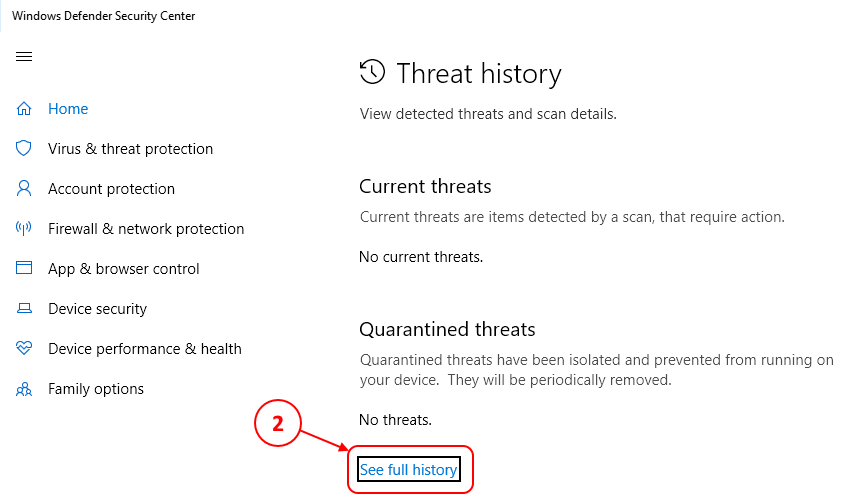
2. Click See full history.
attachment
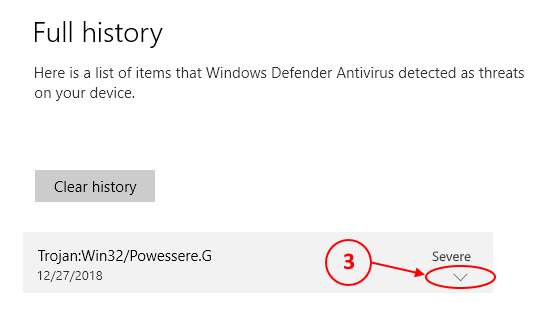
3. Unfold an item in the history list
attachment
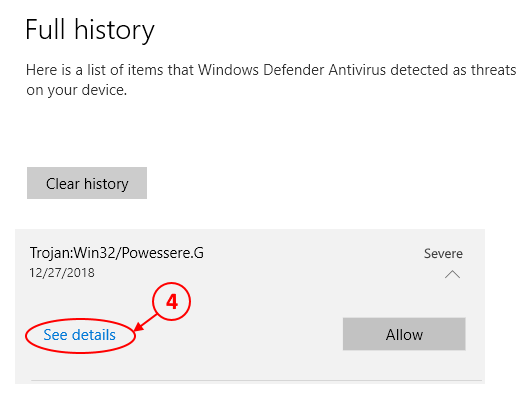
4. Show details window, just to be sure that your are going to whitelist the right file.
attachment
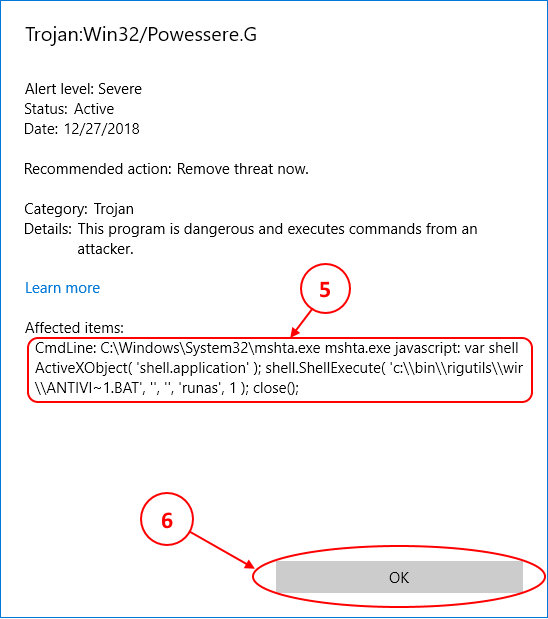
5. Verify that mshta.exe present in Affected items section.
6. Click the OK button
attachment
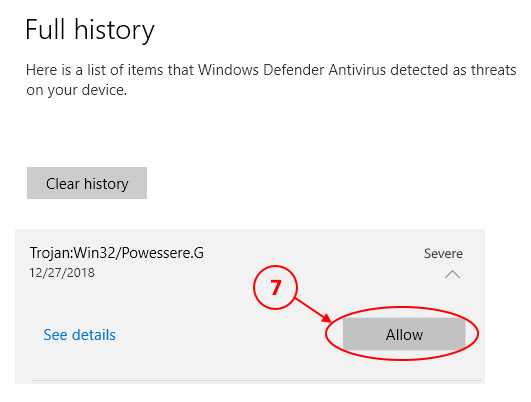
7. Click the Allow button
attachment
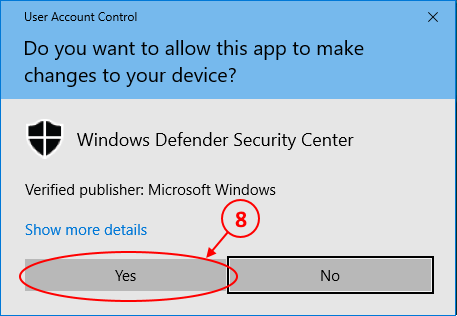
8. Confirm your action by clicking the Yes button. We will disable this silly User Account Control dialog later.
attachment
GitHub: AntiVirusTest.bat